Strange Glyph Font in Chrome – Temporary Solution

Google Chrome glyph font problm

Google Chrome glyph font problm

Chrome Glyph Font Problem – A Temporary Solution

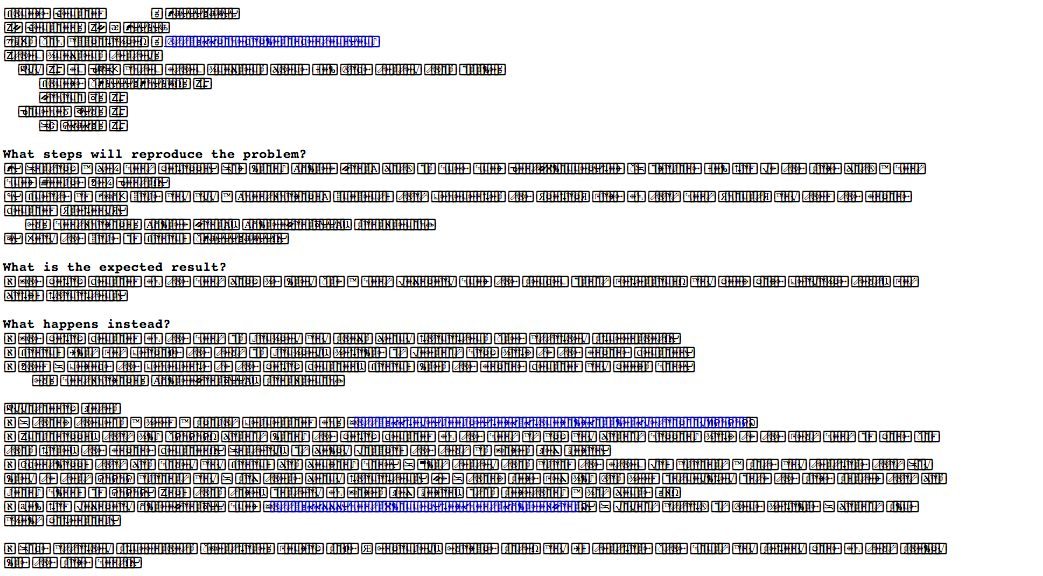
Recently, I’ve noticed that Google Chrome has been displaying a weird glyph font with unreadable characters of certain fonts. None of the typical resolutions have helped, including: refreshing the page, closing the browser or even restarting the computer. I am using the latest version of Google Chrome version: 37.0.2062.120. The other browsers – Firefox, Safari, Opera – all display these same webpages just fine.
Screen Shot 2013-03-29 at 12.20.20 PM

I did some research and found out that I am not alone with this issue and that Google is currently working on a solution. The problem seems to be related to the fonts Helvetica, Helvetica Neue, and Arial. I’m not sure why Google Chrome is the only browser with this issue but I have noticed there are some fonts on web pages that display just fine interspersed with this strange glyph font.

Because I am a graphic designer and I love typography, I found this problem very intriguing. I discovered that if I changed the CSS font-family of a page that had the weird chrome fonts to another sans-serif font such as Gill Sans, I was able to read the page just fine.

A Temporary Solution

I reasoned that if the problems were with those specific fonts – I could deactivate them or replace them with a different font. Unfortunately, some of these fonts are system fonts and cannot be deactivated because they are used by my mac system. So my other thought, that actually works (but is really just a band-aid to the problem until Google solves the issue) is to edit the user specific css file for Chrome.

To find the custom.css file (on a Mac it is in a hidden folder on the newer OSX) go the Finder then click on the Go menu item at the top. After the go menu is listed, hold down the Option key to display the Library option. Releasing the Option key will hide the Library option. You’ll find the custom.css file under the Application Support/Google/Chrome/Default/User StyleSheets/custom.css.

This file is blank unless you edit it. Open the custom.css and add the following code:
@font-face { font-family: ‘sans-serif’; src: local(‘gill sans’); }
@font-face { font-family: ‘helvetica’; src: local(‘gill sans’); }
@font-face { font-family: ‘helvetica neue’; src: local(‘gill sans’); }
@font-face { font-family: ‘Arial’; src: local(‘gill sans’); }

Then save the file, restart Chrome and viola! A temporary fix to the font issue.

Comments

23 responses to “Strange Glyph Font in Chrome – Temporary Solution”

  1. Devonshire Avatar
    Devonshire

    FINALLY. Some sort of fix (although it’s a ‘band-aid’)!!!! I have been trying to figure this out for far too long.

    Thank you, thank you, thank you!

    1. unkletubby Avatar

      FIXED IT! I now use Safari. Problem solved.

  2. jeff Avatar
    jeff

    holding down option key does nothing

    i have the same glyph problem

  3. fabio Avatar
    fabio

    Very thanks, it works perfect

  4. LK Avatar
    LK

    Nope. Won´t work…
    The problem is that there is no permanent fix. For example cleaning font cache (Suitcase 4.0) did the job, but it lasted only 10minutes, and then the glyph-characters were back…

    FRUSTRATING!

    1. Kate Avatar
      Kate

      Found a solution that worked for me:

      Chrome> Preferences > Show Advanced Settings (link at bottom of page)>
      Under Web Content: Customize Fonts>
      For some reason my sans serif was set to Helvetica. Changed to Arial, restarted browser, no more glyphs!

      Maybe this will work for you…?

      1. k Avatar
        k

        This worked for me! i changed from Helvetica to Helvetica Neue and it worked like charm Thanks!

      2. joemoccia Avatar

        worked for me too

      3. sabine Avatar

        YOU are Sanity Saver! THANKS

      4. Sally Avatar
        Sally

        THANK YOU KATE! FINALLY I can read the page!

      5. Tom Avatar
        Tom

        You rock Kate! That’s the only thing that has worked. Thank you so much.

  5. Rich Avatar

    Thanks for he tip but nop didn’t work for me either.
    This problem seems to have random fixes for different people.
    grrrrrr…

  6. Tyler Morrison Avatar

    I found a real solution!!! Your suggestion above got me a temporary fix, but I was still experiencing lots of issues with the use of Gill Sans. It seemed to be really spotty, whether or not the custom.css declarations would work. Some sites like LinkedIn were still almost illegible.

    Here’s what I found…

    It’s not based on the font chosen or any cache related issues. After taking a deep dive in Google, I found that it only seems to be fellow graphic designers who experience this issue (i.e. only those of us using any kind of font management software).

    To solve the issue, I found that you have to tell Chrome to use a font that is NOT being managed by your font manager. Gill Sans, for instance, was still included in my Suitcase Fusion library. As a solution, I went to Google Web Fonts and downloaded Droid Sans, Droid Serif, and Droid Mono. After installing them via the standard Mac Font Utility, I relaunched Google Chrome. Inside of the browser, Preferences > Advanced Options, I was then able to specify each Droid version as the font to use. …Voila. Absolutely ZERO instances of strange glyphs!

    1. stvheld Avatar
      stvheld

      @Tyler very interesting. Thanks for the tip! I’m going to try it right now.

    2. erness Avatar
      erness

      I’ve tried this and it almost work. I still display glyphs in some websites. It’s killing me :( Thanks for the tip though.

  7. dw Avatar
    dw

    ” not sure why Google Chrome is the only browser with this issue.”

    Exactly!! Up till today (9/2013) I still have this problem which people seem already complained about a few years ago. What I don’t understand is with Google’s talents and money resources, how come they still cannot solve this problem which is not even an issue for the other browsers.

    Btw, Chrome seems the only one having problem with yahoo mail too…

    1. stvheld Avatar
      stvheld

      @dw It’s probably not really Chrome’s issue. Like Tyler Morrison mentioned a few comments above, it’s only a problem for us font-management users. Meaning suitcase fusion is the culprit. However, why Chrome is the only browser that has a problem, I don’t know. BUT after implementing his suggestion, I haven’t had glyph problems since.

  8. KD Design Avatar
    KD Design

    I’m still having this issue despite the droid font work around… Its only certain web pages though – anyone else have a suggestion? I have started to prefer working in chrome but if there isn’t a solution I’ll have to switch to something more stable. Ugh on all of this. Glad I’m not the only one having issues though!

  9. Moon Disc Avatar

    I am using Extensis Suitcase Fusion 5 and have had this font render problem since using version 4. It was so bad that I couldn’t really use Chrome at all so I switched to Safari, which I was starting to like better anyway because of bookmark and tab syncing with my iPad and iPhone.

    However, I have started to have problems with Safari as well. Most recently today when trying out Numbers on iCloud. So, inspired by this thread, I used the Web Inspector to delete Helvetica from the font stack (it’s set to “font-family: Helvetica,Arial,sans-serif;”) and it then works fine defaulting to Arial. I replaced Helvetica with Georgia and that also worked. That works until I reload the page of course, but it’s promising. I’ll have to play around with the Safari settings and see what I can find.

    Anybody else having problems with Safari?

    I just tried the tip with Chrome in “Customize fonts” so we’ll see how that goes too.

  10. Marc Ravalovanana Avatar
    Marc Ravalovanana

    finally got this fixed with the css trick. thank you!

    1. drstrik9 Avatar

      I can’t use Chrome at all because of this. I use FontAgent Pro. I believe that google is smart enough and innovative enough to solve this problem. I just don’t understand why they don’t care enough to do so.

  11. Rich Graham Avatar

    You just saved me from tossing my MBP out the window. Thanks you good sir!

  12. lis_locket Avatar

    Unfortunately the above didnt work for me (or maybe it did as a precursor for every other fix i tried!).
    I did the following which worked for me:
    http://www.extensis.com/support/knowledge-base/clearing-the-mac-os-x-font-cache/

Leave a Reply

Your email address will not be published. Required fields are marked *